
How to Create a Powerful Podcast from Your Old Videos Using CapCut Web
There is something strangely gratifying about unearthing the creative work you made months ago — videos resting in your folders or half-remembered on YouTube. They had a flicker, a meaning, a message. But what if you brought them back again, not as another video or post, but as something more profound that people can listen to and connect with anywhere, anytime? That’s precisely where CapCut Web makes your projects fresh again.
You don’t need a studio, a fancy mic, or weeks of editing. All you need is your browser and a handful of those old videos. With the right tools — powered by AI — you can turn your visuals into polished, professional-quality podcasts that sound like they were recorded yesterday. Let’s break down how you can turn yesterday’s content into today’s podcast masterpiece.
Why podcasts are the next evolution for creators
Podcasts have gone from niche to necessity. They’re personal, portable, and powerful. For creators, they’re an untapped channel of storytelling. You can reach audiences who prefer to listen, not watch — during their commute, while working out, or just relaxing.
And here’s the fun part: if you’ve been making videos, you already have everything you need. You’ve got stories, interviews, lessons — goldmine content. The trick is extracting that value and presenting it in a form that’s easy to digest.
That’s where CapCut Web steps in — turning long videos into smooth, story-driven audio episodes with a few smart clicks.
Crafting your podcast narrative
Before jumping into editing, take a few minutes to plan your podcast flow. Think of your old videos like raw chapters in a book. Each one has a message — a hook, a theme, a takeaway. Your job now is to organize them into a cohesive narrative.
Start by listing your best-performing videos or clips that genuinely connect with your audience. Then ask yourself:
CapCut Web’s AI video generator will allow your workflow to run more smoothly by quickly discovering and highlighting key themes and audio snippets. The AI summarizes the video structure and analyzes the video to automate the finding of highlights that can serve as your intros or transitions.
It’s as if you have an editor who will establish your best moments without you needing to search manually.
Taking visuals and turning them into audio gold (A step-by-step plan)
Now, we want to get to the core of it all; extract audio from video – taking your videos and turning them into clean audio that is ready to publish for your podcast.
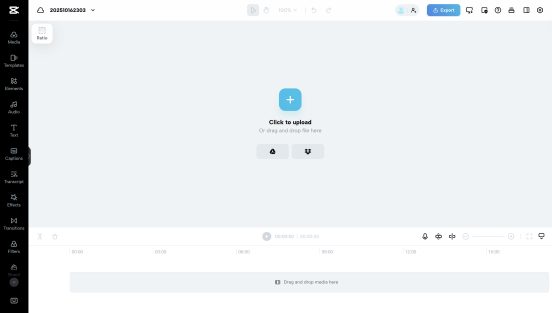
Start by uploading your video to CapCut Web — the place where your visuals start their audio transformation journey.
You can drag and drop the file directly, import it from Google Drive or Dropbox, or use the “Scan QR code to upload” feature from your phone for instant access.
Once it’s uploaded, CapCut Web automatically prepares your project, giving you a clean and ready workspace to begin extracting pure, story-driven sound.
Step 2: Extract audio from your video
Now, let the real magic happen.
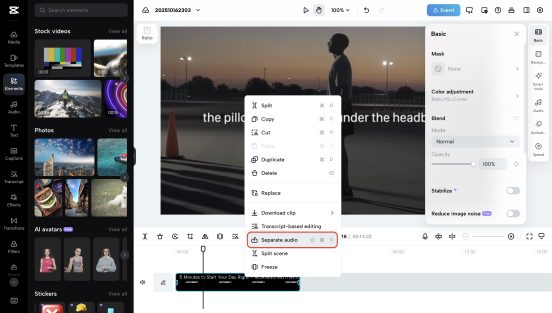
Just right-click the clip in your timeline and hit “Separate audio” — CapCut Web instantly pulls out the sound, preserving every tone and nuance from your visuals.
From here, fine-tune your track using innovative AI tools. Adjust speed, tweak the pitch, or clean up background noise for a sharper, studio-quality finish.
If you want to add creativity, try CapCut’s built-in voice changer effects to give your audio a signature touch — playful, dramatic, or professional.
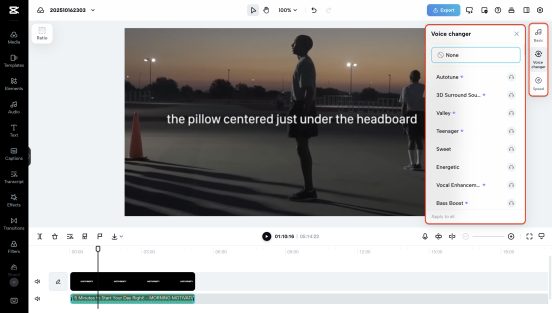
Step 4: Export and share your masterpiece
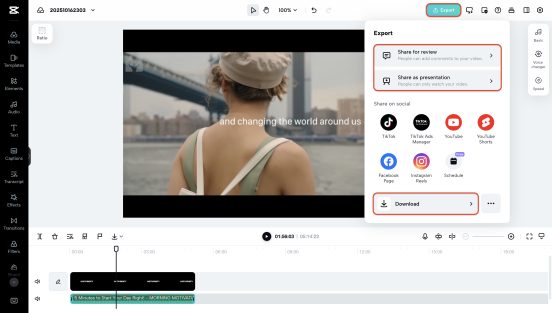
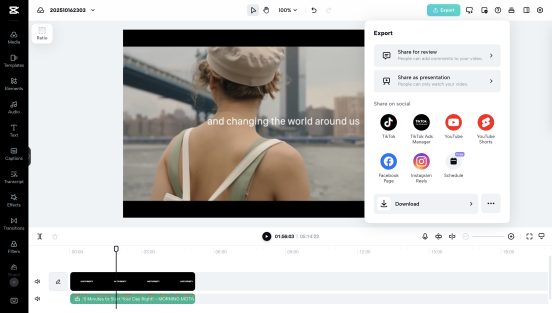
When your audio sounds just right, click “Export” in the top right corner.
CapCut Web lets you download your file instantly — watermark-free, crisp, and high-quality.
You can also share it directly to your favorite social platforms like YouTube, TikTok, or Instagram Reels, or save it securely in CapCut Web’s free cloud storage for later.
Within minutes, your visuals transform into clear, engaging audio — ready to become your following standout clip, podcast episode, or campaign soundbite.
Designing your podcast visuals
A podcast isn’t only about what people hear — it’s about what they see first. Eye-catching cover art is your brand’s first handshake with the listener. That’s where CapCut Web’s online photo editor comes in. Inside the AI-powered workspace, you can easily design high-quality banners, thumbnails, and episode covers.
Upload your brand logo, add minimalist text, and let the AI suggest layout and color schemes that match your tone. You may be creating something sleek for a tech podcast, or warm and earthy for a personal storytelling show. The AI adjusts accordingly — fast, accurate, aesthetic. It’s a designer’s eye, powered by machine intelligence.
Bringing your podcast to life with AI visuals
Want to make your podcast more discoverable on social media? Use AI video generator again — this time, to create short promo clips.
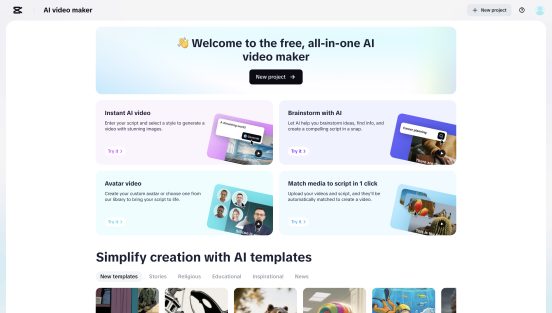
Just take snippets of your audio, add subtitles, and let the AI visualize them with motion graphics or avatars. This helps turn a purely audio experience into a visual teaser, perfect for TikTok, LinkedIn, or YouTube Shorts.
It’s one of the easiest ways to attract new listeners who might not have found you otherwise.
Publishing and promoting your show
Once you’ve designed your cover, polished your audio, and created a few teaser visuals, it’s time to publish. CapCut Web lets you export files optimized for each platform — from vertical reels to square thumbnails.
For a professional touch, use the same template across episodes. Keep the tone consistent, from your color palette to font style. It helps build recognition, which is crucial in the crowded podcast world.
After launch, share short clips from your audio episodes regularly. Think of them as your show’s “trailers.” Post them on Instagram stories or YouTube Community to keep engagement alive between releases.
Why CapCut Web makes podcasting effortless
In the past, creating a podcast required juggling five different tools — one for video, one for audio, one for graphics, one for storage, and one for publishing. Now, everything happens in one seamless space.
CapCut Web doesn’t just make editing easier; it makes creation flow. From separating high-quality audio to designing brand visuals and building short-form video teasers, every step fits together intuitively.
And the best part? It’s all free to start.
Your old videos still have stories to tell. They literally need a new voice — literally.
With CapCut Web, you can turn forgotten files into a professional podcast series that travels further than visuals ever could. The AI video generator helps you identify and reframe your best ideas. The extract audio from video tools pulls out crisp soundtracks that captivate.
And the online photo editor gives your show a strong visual identity. So, before you hit delete on those old clips, try something different — upload them to CapCut Web. Ten minutes later, you might be listening to your next great podcast episode.
Join Our WhatsApp Channel To Receive Updates
Join Our Facebook Channel To Receive Updates
Click Here to Join Our Telegram Channel To Receive Updates